For developers, architects and AI engineers. How Hippocampus works under the hood, how to connect assistants and agents to it, and how to build on it safely.
Thalius Hippocampus · October 2026 · thalius.ai/developers
Hippocampus is a memory layer for LLMs: an external, structured memory that sits between an organisation's documents and the models and agents that need them.
| Property | What it means for you |
|---|---|
| Read once, navigate cheaply | Documents are processed at import into a layered memory (summaries, sections, links). Questions don't re-read the corpus |
| Small, exact context | Retrieval returns only the passages a question needs, so the model's context stays small however large the corpus grows |
| Search without a generative model | Candidate material is found from titles, links, summaries, keywords and embeddings. Models only pick from that small set and write the answer |
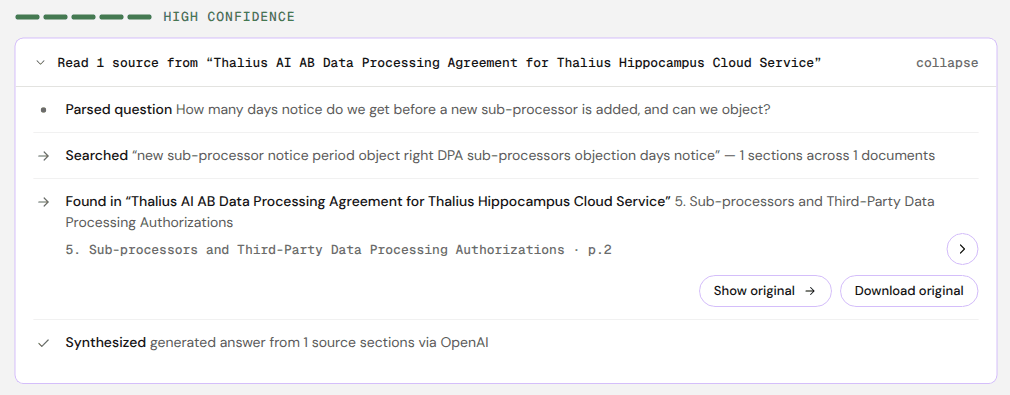
| Cited by construction | Every answer is built from passages that carry document, section and page |
| Declines when unsupported | If the retrieved passages don't support an answer, the system says so instead of guessing |
| Hypertext memory | The memory is a wiki the AI builds and maintains, and the same pages people browse and check. Hypertext is something LLMs handle well |
| Permission-aware | Every search runs as a specific person, filtered to what they may read |
| Model-agnostic | Claude, GPT, Gemini or an open-weight model writes the answer; switching needs no re-import |
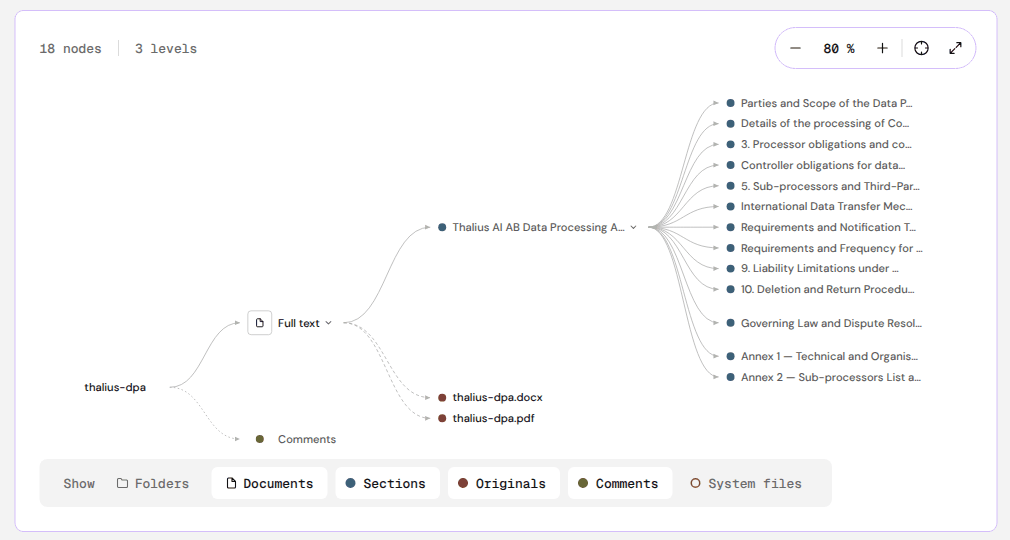
At import, each document becomes a tree: the original file, its full text, one node per section, and summaries at document and folder level, with an index over all of them. Scanned pages are read with OCR.
At question time, two funnels run over that tree and their results are fused into one ranking:
| Funnel | How it works |
|---|---|
| Top-down | Starts from titles and the index summary, follows links into the section summaries that match the question, and opens full text only where needed |
| Bottom-up | Searches the leaf sections directly with keywords and embeddings |
Both funnels run on the index, not on a generative model. The answer model then receives only the selected passages and writes the answer with citations.
Quality control is part of the memory. Summaries are caches of the source: each can be rebuilt from it. People work in the same wiki the AI builds, can correct it, and cases that need judgement go to a person.
| Level | Contains | Notes |
|---|---|---|
| Tenant | Everything one organisation (or team) owns | Its own address <name>.hippo.thalius.ai, members, credits, encryption context and search collections |
| Folder | Folders and documents | Nested up to 32 levels. Access is granted per folder and inherited. Names starting with _ are reserved for the system |
| Document | The original file, full text, sections, summary, comments, change log | Documents can also be written in the app (Markdown) |
| Section | One part of the document's structure | Carries its page range in the original |
| Summary | Folder, document and section summaries | Generated; rebuilt when the source changes |
Every page is Markdown with YAML frontmatter. In the app, ⋯ → Show frontmatter shows the metadata, and ⋯ → Markdown / Show MD gives the text. A simplified example (fields vary by page type):
type: summary
title: Data Processing Agreement for the Hippocampus Cloud Service
description: Defines the obligations between the Controller and the Processor…
generated:
  by: hippocampus-ingest
  at: 2026-10-10T12:00:39Z
  digest: sha256:…
sources:
  - resource: /Legal docs/thalius-dpa
Getting data out: originals can always be downloaded, and the knowledge base can be exported as Markdown. Deleting a source document deletes everything derived from it (summaries, index entries, links).
| Way | For | Status |
|---|---|---|
| Web app (hippo.thalius.ai) | People: import, browse, ask, share, administer | Available |
| MCP server | AI assistants and agents: Claude, ChatGPT, coding agents, MCP-capable Microsoft tools, your own agents | Available on Starter and Corporate (beta) |
| REST API | Your own code: ask, search, walk the document tree | Beta; API keys are coming |
All three use the same memory and the same permissions.
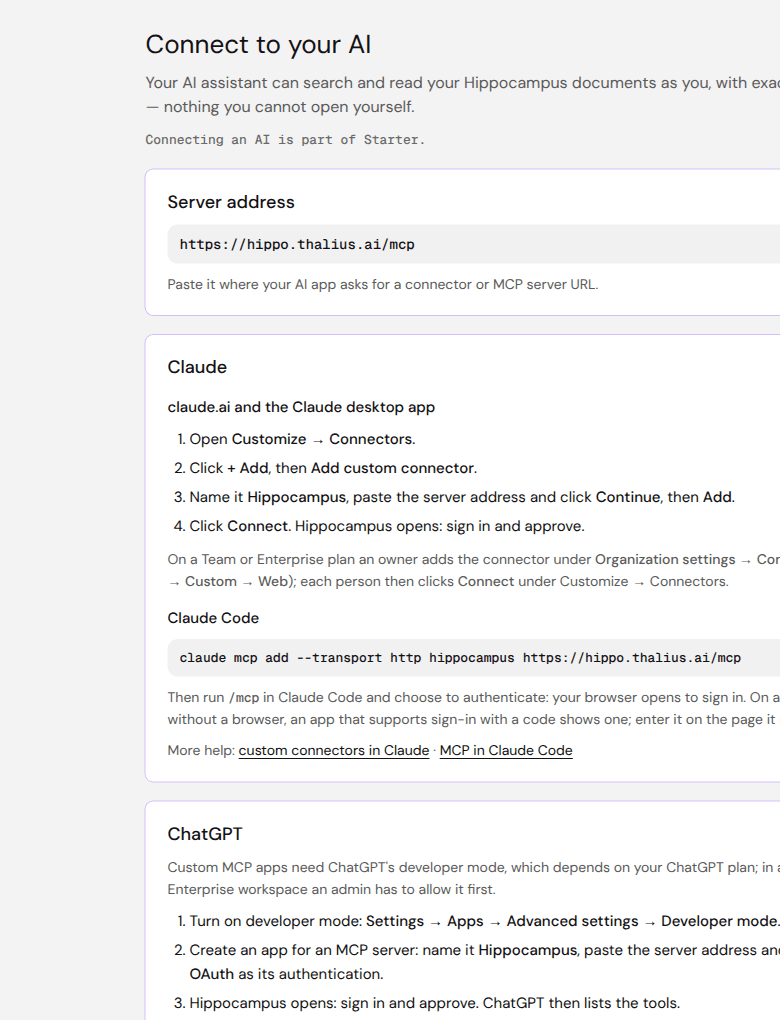
| Address | https://hippo.thalius.ai/mcp (shown in the app under Connect to your AI) |
| Transport | Streamable HTTP |
| Authorization | OAuth, following the MCP authorization flow: no token to paste. The client discovers the sign-in server, registers and opens the Hippocampus sign-in page. Clients without a browser can use sign-in with a code where they support it |
| Identity | The client acts as the signed-in person, with exactly their access, in the tenant they choose at approval |
| Plans | Starter and Corporate. On Free, approval is refused |
| Capability | Notes |
|---|---|
| Ask and search | Over the whole knowledge base or scoped to a folder or document; results carry document, section and page |
| Browse | Folders and the documents in them |
| Read | A document's or section's text (Markdown) and metadata |
| Add documents | Only if the client asked for it and the person approved it at sign-in |
Searches and questions cost credits; reading is free (see Costs).
| Client | Steps |
|---|---|
| Claude (claude.ai, desktop) | Customize → Connectors → + Add → Add custom connector → name Hippocampus, paste the address → Continue, Add → Connect, sign in, approve. On Team and Enterprise plans an owner adds the connector under Organization settings → Connectors first |
| Claude Code | claude mcp add --transport http hippocampus https://hippo.thalius.ai/mcp, then run /mcp and authenticate |
| ChatGPT | Settings → Apps → Advanced settings → Developer mode, create an app for an MCP server named Hippocampus, paste the address, authentication OAuth, sign in, approve. Business and Enterprise admins must allow developer mode first |
| Other MCP clients (e.g. Cursor, VS Code / GitHub Copilot, Microsoft Copilot Studio) | Add a remote MCP server with the address above and sign in when asked. Clients that need a pre-registered OAuth client: contact us |
When a client connects, Hippocampus shows:
Operator (super-admin) accounts can't connect; use a normal account.
| Connected apps | Each person sees the apps connected to their account in the tenant. Disconnect ends access at once. Removing the connector only inside Claude or ChatGPT isn't enough |
| AI connector activity | History → AI connector activity lists each search, open and read an assistant made for that person, with the client and folder. Visible only to that person, kept 90 days |
| Access follows the person | When their access to a folder ends, the assistant's ends too |
The REST API lets your own code ask questions, search and walk the document tree in the same memory, under the same permissions as a person.
| Status | Beta. Self-service API keys are coming. Settings → API and MCP shows the current state for your tenant |
| Early access | Write to letstalk@thalius.ai with your use case |
| Unattended automation | On Corporate, talk to us about service accounts |
The reference, an OpenAPI description and examples will be published at thalius.ai/developers.
| Pattern | How | Example |
|---|---|---|
| Grounded team assistant | Connect Claude or ChatGPT over MCP; people keep their usual assistant | "Search Hippocampus for our travel policy and quote the rule on taxis after 22:00, with the page." |
| Coding agent with project knowledge | Claude Code (or another MCP client) reads specs, ADRs and runbooks from Hippocampus while working | "Check the integration spec in Hippocampus before changing the export format." |
| Support copilot | An agent answers from manuals and FAQs, quotes the passage, and hands over to a person when Hippocampus declines | "Customer has error 41 on firmware 3.2: what are the fix steps?" |
| Agent in a workflow | A workflow agent asks mid-task and acts on the cited answer | A procurement agent checks a contract's notice period before raising a renewal task |
| Document intake | An agent with write permission adds documents to a folder as they arrive | Signed contracts filed into Contracts/{Supplier} |
| No-code team use | The web app, shared folders and the phone view | Care staff look up routines between tasks |
| Layer | Behaviour | What it means for your integration |
|---|---|---|
| Identity | Every request carries a signed token, checked by the app and again by each backend service. SAML / OIDC SSO on Corporate | No shared secrets in prompts or configs; access is tied to a person |
| Authorization | Folder and document grants, groups and inheritance, applied as a filter inside the search engine before ranking. A summary built from several documents is visible only to people who can read all of them. If permissions can't be checked, the search returns nothing | An agent can't retrieve, cite or be inspired by a document its user can't open |
| Tenant isolation | Each tenant has its own search collections; the tenant's identity is bound into every encryption | No cross-tenant leakage, even by mistake |
| Encryption at rest | Per-document keys (XChaCha20-Poly1305, 256-bit) wrapped by a cloud KMS; opaque storage names. Corporate: keys in your own KMS | Storage or backup copies are unreadable |
| Conversation data | Questions and answers encrypted with tenant-specific keys (AES-256-GCM) | |
| Audit | Sequence-numbered, hash-chained audit log of security-relevant operations; answers cite the exact passage used | You can show which content an answer used, not just which file was opened |
| Prompt-injection hardening | Document text is treated as data; rendered output passes an allowlist sanitiser, with a Content Security Policy and frame protection | Still treat retrieved text as untrusted in your own agent (see Best practices) |
| Transport | Public endpoints negotiate hybrid post-quantum key exchange (X25519 + ML-KEM-768) | |
| Model providers | Receive only the passages needed for one step, may not train on them, and are named on the public sub-processor list | Data minimisation by design |
| Residency | Stored encrypted in the EU (Finland). On Corporate, every component, including model inference, can run EU-hosted or in your own environment |
Legal and review documents: thalius.ai/legal/dpa, /legal/subprocessors, /legal/ai-act, /security. Security questionnaires: security@thalius.ai.
| Answer models | Claude, GPT and Gemini today, configured per tenant; open-weight models on Corporate |
| Default | The tenant owner sets the default answer model (Settings → Profile). The model used is shown under each answer |
| Switching | No re-import needed: the memory is model-independent |
| Your own key | Corporate: use your organisation's own model key or endpoint |
| Planned | More providers, including European ones (Mistral, Cohere), with a choice of who reads documents and writes answers |
The same memory makes small models useful. On the public FDA benchmark (2,198 pages), a small model answering through Hippocampus got 40 of 48 questions right, more than the same model with three other retrieval systems or with no retrieval at all.
| Formats | PDF (text or scanned), Word (.docx), PowerPoint (.pptx), Excel (.xlsx), Markdown (.md, .markdown), text (.txt, .text) |
| File size | 95 MB per file |
| Per import | 5,000 files; folder trees keep their structure |
| Folder depth | 32 levels |
| Skipped | Empty files, hidden and lock files (.DS_Store, Thumbs.db, ~$ files) |
| Reading quality | Standard, or Advanced models (Starter, Corporate) for hard pages: poor scans, tables, formulas |
| Duplicates | A file already imported is reported as already imported |
| Re-import | Importing a changed file again updates the document; you're warned if its text was edited by hand |
Usage is counted in credits (1 credit = €0.01), the same in the app, over MCP and over the API.
| Action | Credits |
|---|---|
| Import a text page | 1 |
| Import a scanned page | 2 |
| Import a page with tables, formulas or images | 3 |
| Import a page with Advanced models | 5 |
| Read (documents, sections, summaries, Markdown) | 0 |
| Search | 2 |
| Question (answer written by the default model) | 3 |
| Question with the premium answer model | 10 |
A stopped answer isn't charged for the answer. Plans: Free 1,000 credits a month (no MCP); Starter €30 a month with 3,000 credits (+1,000 per extra user, top-ups €10 per 1,000); Corporate custom. Current figures: thalius.ai/pricing.
Design tip: let agents search and read (cheap, exact, free to read) and reserve questions for when you want Hippocampus to write the cited answer.
| Option | What runs where |
|---|---|
| Hippocampus Cloud (default) | EU-hosted; nothing to operate |
| Your own cloud (Corporate) | The same product in your organisation's cloud |
| On-premises (Corporate) | The same product on your own hardware, models included where required |
| Item | Status |
|---|---|
| Web app | Available (beta channel) |
| MCP server | Available on Starter and Corporate (beta) |
| REST API | Beta; self-service API keys coming |
| Single sign-on (SAML, OIDC) | Corporate |
| More model providers, incl. EU-based | Planned |
| RAG evaluator: run the public benchmark on your own documents | In build |
| Do | Why |
|---|---|
| Scope searches to the folder that holds the answer | Faster, cheaper, fewer distractors |
| Ask the assistant to quote and cite ("…with document and page") | Keeps answers checkable for users |
| Treat "the documents don't say" as a signal, not an error | Route to a person or another source instead of letting your agent improvise |
| Treat retrieved text as untrusted input in your own agent | Documents can contain text written to manipulate an AI; don't let it trigger tools or override instructions |
| Least privilege | Connect with an account that can open only what the agent needs; grant add documents only to agents that file documents |
| Keep the memory current | Re-import new versions and delete outdated ones; everything derived follows |
| Search + read before ask | Search and read are cheap; reading is free |
| Review connected apps regularly | Disconnect what isn't used; check AI connector activity |
| Developer pages | thalius.ai/developers |
| Evidence and benchmark method | thalius.ai/evidence |
| Security | thalius.ai/security · security@thalius.ai |
| Product and API access | letstalk@thalius.ai |
| User Guide, FAQ, use cases | User Guide · FAQ · Top 20 use cases · Business Guide |